In Search of the Frontier at Home
The chronicles of attempting to find the best version of GLM 5.2 to run locally and ending up with DeepSeek-V4-Flash
Running AI local has always been my goal, ever since I trained my first seq2seq chatbot in 2017. In this era, language models were very much the wild west and anyone could make the best model.
From the moment that Github Copilot came out though, it largely became the case that you'd be depending on some larger corp to serve you your AI (and take it away at will). Moments like OpenAI determining GPT-2 was maybe too dangerous to release, or Anthropic pulling Fable and only giving it to the most trustworthy people (other mega tech corps) have solidified in me a drive to run local AI only and stop relying on these subsidized APIs like coding subs.
If you're building a business, or just using coding agents in your work, it's exceptionally disruptive when the API drops or you've hit your quota. Or worse: when the API service degrades and serves a more heavily quantized version of the model without your knowledge. As you'll see in this report, quantization has a huge impact. Everything is a tradeoff.
If you're reading this, you probably don't need to be convinced you want to run frontier AI at home, however. The main issue I see with running large models at home, other than the money, is the complexity and number of variables you need to consider. Once you start stacking 2, 4, 8 GPUs, using risers, degrading PCIe performance, quantizing models, degrading KV cache to hold more context, deciding between tensor parallelism and pipeline parallelism, speculative decoding and multi-token-prediction techniques ... well yeah things get complicated, fast. My hope is to share some of my own personal findings with Z.ai's GLM 5.2, along with DeepSeek V4 Flash and MiniMax M3.
Methodology
All benchmarks were run using Terminal-Bench v2.1, a terminal-based evaluation suite designed to
measure how well models perform on real-world command-line and coding tasks. Each model is given a task (e.g. "write a Python script to parse this log file" or
"explain what this iptables rule does") and scored on correctness, completeness, and
whether it actually produces working output.
We are running this benchmark through the minimalistic coding agent harness called Minion.
Except for the FP8 baseline via OpenRouter, every test was run on local hardware The goal is to measure what we actually get with frontier at home.
Models and variants tested
Here's every model and quantization variant we ran through the benchmarks, along with their memory footprint and observed throughput. All local throughput numbers were measured on the rig described above with a batch size of 1 and context length matching each benchmark task.
Note: The only model that we're testing at native precision is DeepSeek V4 Flash. Given the results of these tests, I think this may be an important factor. The DSV4F vLLM exact setup is from: https://github.com/local-inference-lab/rtx6kpro/blob/master/models/ds4dspark-v8.md
I cannot thank the RTX PRO 6K Discord enough for sharing a resource like this! If you are on PCIe 5.0, your t/s will be closer to ~350 btw. Kinda bonkers.
Questions I wanted to answer
I think many people run quants, do speculative decoding, downgrade KV, without fully understanding the intelligence lost when doing it. I really wanted to quantify this for myself, since I also did not have a solid idea of this.
A Terminal Benchmark
Alright, let's get to the findings. First, overall results:
Without too much surprise, the model using 784GB of memory is indeed the top performer. That said, 64% is a pretty significant drop from the reported full precision 77.9% Terminal-Bench v2.1 score. So we're taking a decent hit dropping even to 8bit, and 8bit is often the best precision any API provider offers.
I initially began these benchmarks not even planning to mess with DeepSeek V4 Flash, but when GLM 5.2 IQ4_NL scored 52% vs 8bit GLM being 64% and the full native precision being 77.9%, I revisited the Terminal Bench v2.1 leaderboards to find a model that I could maybe run at native precision and test. Doing this, DeepSeek-V4-Flash jumped out as an obvious candidate, and I'm glad I tested this one.
I am somewhat surprised that DeepSeek-V4-Flash outperformed the 4bit GLM 5.2. I will note, however, that the scores I am personally seeing seem to be "weaker" than what I find on leaderboards. DeepSeek-V4-Flash for example shows a 61.8% score, which means allegedly for others it passed on 5 more questions than what I saw.
It's possible this is my harness being bad. For all of these tests, I am running things through a very minimalistic Minion harness that I wrote, but from all my analysis so far, I do not see anything falling through the cracks or behaving weird. It appears to all be legitimate LLM intelligence failures.
It's also very difficult to find official benchmarks for quants. So the 4 bits might be totally fair and expected, and the DeepSeek-V4-Flash difference could just be degradation from MTP=2.
If I've learned anything, it's to avoid 8bit KV cache.
I was always under the assumption that 8bit KV cache was essentially free context. But for sure with GLM 5.2, this is simply not true and you should avoid it like the plague (stay with FP16).
We also confirmed that the 2 bit GLM 5.2 (254GB) outperformed the slightly larger 4 bit MiniMax M3 (265GB), suggesting that GLM 5.2 really is the better model. But this doesn't mean that it's always better to go with a heavier quant of a bigger model, because DeepSeek-V4-Flash (Mixed) seems to outperform the 4bit GLM 5.2.
More interestingly, I've learned that quantization impacts models more than I thought it did. We see significant degradation even to 8-bit, which I always thought was truly free. Then further down to 4, which I thought was less of a hit to performance than it is.
It was only after getting the GLM 5.2 FP8 results that I sought a model that I could run at native precision, and that's how DeepSeek-V4-Flash found its way into the test at all, but now it may be the model I end up running as my main model, even though my original goal was to figure out which quant of GLM 5.2 that I'd be using.
The other benefit for DeepSeek, is there's a specific vLLM build setup for 4x RTX Pro 6K rigs to take advantage of, giving us a decent boost to t/s. Which leads us to token usage.
Beyond the scores
Besides the end-result number, another very important detail is how quickly we got there. Different quants and different models all have a different tokens per second rates. Depending on how you've set up your server, you will also see wildly varying parallelization performance as you scale batch size/concurrency.
// Output tokens parsed from agent traces · averaged per task · TIME = avg_tok ÷ t‑per‑sec
Even though DeepSeek-V4-Flash uses quite a bit more tokens to get the job done, it is still faster than the best local GLM 5.2 I ran. The reality of actual time per task was much worse than this too, because of concurrency. I can run the entire Terminal Bench v2.1 against DeepSeek-V4-Flash exceptionally fast because I can run 8 concurrent tasks with aggregate t/s over 1,000! The llama.cpp pipeline parallelism gives me much less. You get a little aggregate bump with concurrency, but nothing like what we're seeing on vLLM tensor parallelism.
▸ vLLM — DeepSeek-V4-Flash
FLASHINFER_MLA_SPARSE_DSV4 attention + flashinfer_cutlass MoE
--max-model-len) — not a shared pool; each concurrent request gets its own full context window
--gpu-memory-utilization 0.85)
--kv-cache-dtype fp8 --block-size 256)
--speculative-config)
--max-num-seqs 64 (admission ceiling) + --max-num-batched-tokens 8192; actual in-flight limit is lower — VRAM determines how many can simultaneously hold full 262K context
bash /home/h/rtx6kpro/scripts/run-ds4-v8-server.sh (see ds4dspark-v8.md)
▸ llama.cpp — GLM-5.2 (GGUF)
llama-server
--split-mode layer with --tensor-split 1,0.75,0.9,1 (uneven split matching PCIe lane allocation: GPUs 0/2 at x8, GPUs 1/3 at x16)
--n-gpu-layers all, no CPU offload
--ctx-size 170000)
--cache-type-k f16 --cache-type-v f16) with --kv-unified — shared KV cache across all GPUs
--flash-attn on
--parallel 4 — up to 4 concurrent requests
--temp 1.0 --top-p 0.95 --min-p 0.01
--jinja (Jinja2 chat template)
CUDA_SCALE_LAUNCH_QUEUES=4x /home/h/llama.cpp/build/bin/llama-server …
The tough thing about actual frontier at home is all of the tiny little details to make it actually happen. Because you can't actually just start stuffing cards into your computer and boom done.
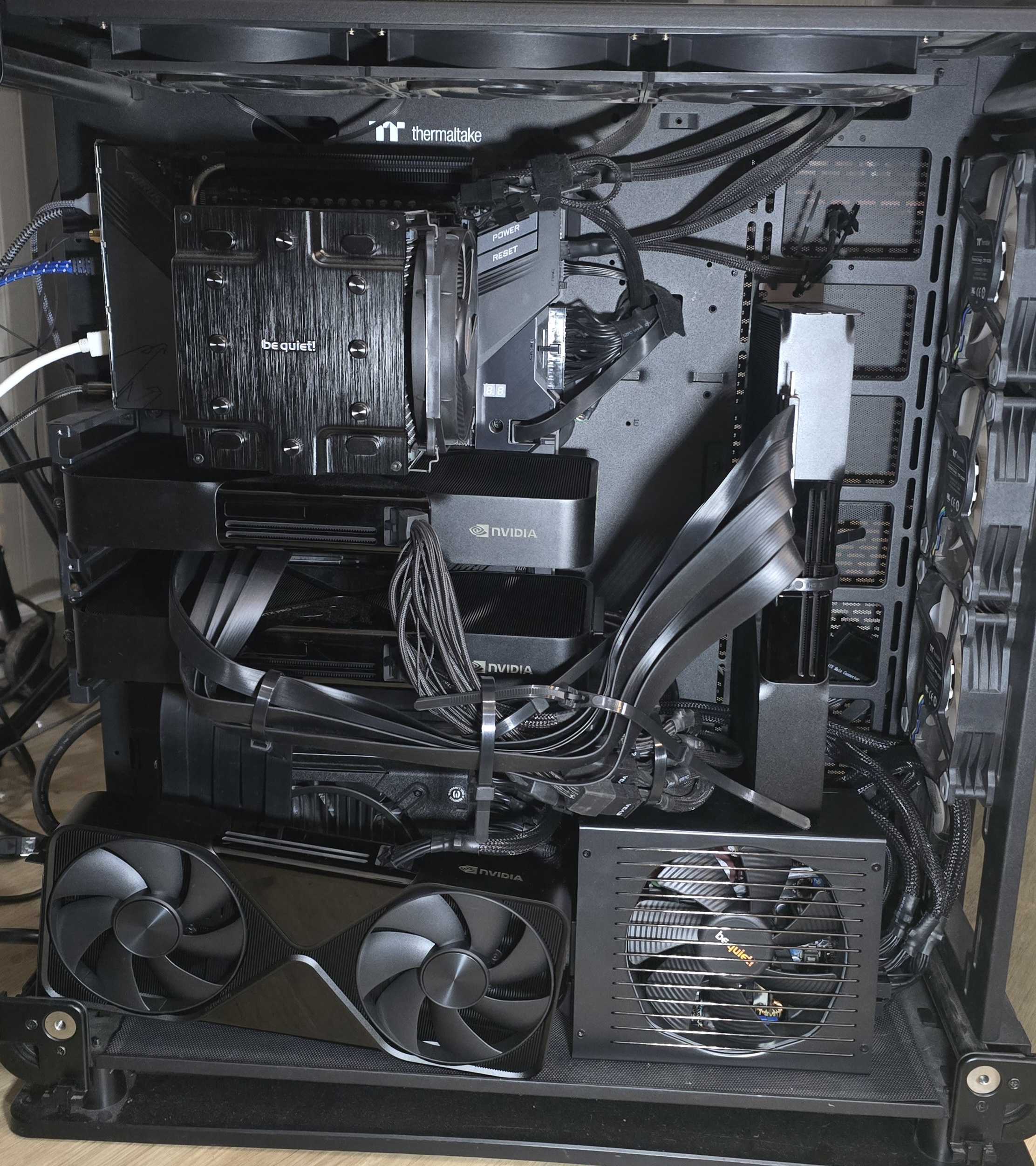
Here are just some of the issues I've faced while jumping from 1 to 2, 3, and 4 GPUs:
— I had to remove some of my M.2 NVMe drives to free up PCIe lanes for the extra GPUs. Threadripper gives you 64 lanes, but the motherboard distributes them across slots and storage in ways that aren't always obvious.
— Added an auxiliary PSU to power cards #3 and #4, because even a beefy 1600W unit doesn't come with enough PCIe power connectors for four pro cards drawing 600 W each.
— Above 4G Decoding — this BIOS setting maps GPU BAR (Base Address Register) memory above the 4 GB physical address boundary. Without it, the CPU can only address 4 GB of MMIO space total, which gets eaten up by just one or two GPUs. With four RTX PRO 6000s, each exposing ~64 GB of BAR1, the system flat-out refuses to boot if Above 4G Decoding is off. Modern boards call this "Resizable BAR" or "Re-Size BAR Support" on the GPU side.
— Tensor parallelism vs. pipeline parallelism — why use --split-mode layer with
llama.cpp instead of TP? The short answer: llama.cpp doesn't support TP. It splits layers across GPUs (pipeline-style, PP),
not individual tensors. That means each GPU holds entire layers, so your step latency is the sum of all the micro-steps
across devices. vLLM, by contrast, does support TP, where every GPU works on the same layer simultaneously,
which is why DeepSeek-V4-Flash gets such great throughput.
— PCIe signal degradation w/ Risers — If you try to just stack the RTX Pro 6Ks right on top of each other, you will overheat them. They need a bit of space, so then you need risers. The longer the riser though, the more chance you have of signal degradation. And then cards just don't even show up on nvidia-smi. PCIe 3.0 vs 4.0 is nearly irrelevant when you're doing Pipeline Parallelism, but matters a bunch with Tensor Parallelism. And then again PCIe 4.0 to 5.0, but my motherboard is PCIe 4.0. These details matter less if you're using llama.cpp, but start to become meaningful with TP w/ vLLM.
Could you run TP on llama.cpp? Not currently, it doesn't support it. It's a fundamentally different architecture. There are forks like llama.cpp-tp that add it, but they lag behind upstream and I haven't tested them.
Multi-step scheduling (MTP) --multi-step=2 in vLLM batches multiple decode steps before
returning control, reducing GPU kernel launch overhead in the continuous batching loop. With --parallel 8
on the vLLM side, this compounds: you get high throughput because TP makes each step fast, and MTP makes fewer steps
happen. On llama.cpp I ran --parallel 4 but without multi-step, partly because llama.cpp's scheduler
doesn't do speculative multi-step the same way, and partly because PP already adds enough latency that the relative
gain is smaller. Worth experimenting with though.
If you attempt to run GLM 5.2 even on NVFP4 on vLLM, you need more like 6-8 RTX Pro 6Ks. There are some model variants like this one (https://huggingface.co/canada-quant/GLM-5.2-W4A16-MTP) that claims FP8 performance, but in ~401GB memory.
That's just out of reach for my 4x RTX Pro 6K build, but who knows. That's the constant thing.
There's a model. There's its benchmark scores.
Then there's that model @ whatever quant you can actually run, at whatever speed you find acceptable. As you turn various knobs both in software and your hardware, your model's actual performance varies. I see most people focus on tok/sec and spend almost no time considering performance degradation. From what I've seen here, however, we should be paying much closer attention to every little detail and its impact on overall performance because small things can have minor impacts to tok/sec but huge impacts on actual model intelligence.
If you need to run it twice, then 50% faster tok/sec isn't worth it! Also, the TP gives us such an insane delta in aggregate tok/sec if we're running concurrency.
So for example, let's say we've got 32K context and want to compare per-stream tok/sec vs aggregate throughput.
Per-stream tok/sec at various concurrency levels (32K context).
The per-stream numbers tell one story, but aggregate throughput tells the real one:
Aggregate tok/sec = per-stream × concurrency.
With llama.cpp's pipeline parallelism, aggregate throughput only grows about 2× from 1 to 8 concurrent tasks (40 → 88 t/s). With vLLM's tensor parallelism, aggregate throughput skyrockets 6.7× (185 → 1,240 t/s). That's the difference between waiting for one response at a time and blasting through 8 tasks simultaneously. At 8 concurrent, vLLM delivers over 14× the aggregate throughput of llama.cpp.
Okay that's all for now! I will leave you with the exact pass/fail per task, organized by category of tasks for Terminal-Bench v2.1. Enjoy!